What's new
A new version of Threadbear comes out most days. The big changes are up top with a look at them, and the little ones are underneath.

Sunday 15 November 2026
4 changed, 1 fixed · Every change
Changed
- Writing Tools and the Mac's text services work on words you select in the new app, as they did in the old one
- A reply streaming into a thread no longer redraws the whole of the new app for every few words, so it stays quick while agents talk
- In the new app, the sidebar's counts and dots pop in when they turn up, and a row's status words fade over as they change, as they did in the old app
- The new app waits for ten quiet minutes of changes before it builds an update, rather than building every one
Fixed
- A file an agent pinned and opened for you in the new app could fail to open when Highlights was slow or failed to load once
Saturday 14 November 2026
9 new, 17 changed, 7 fixed · Every change
Added
The new app, for everyone
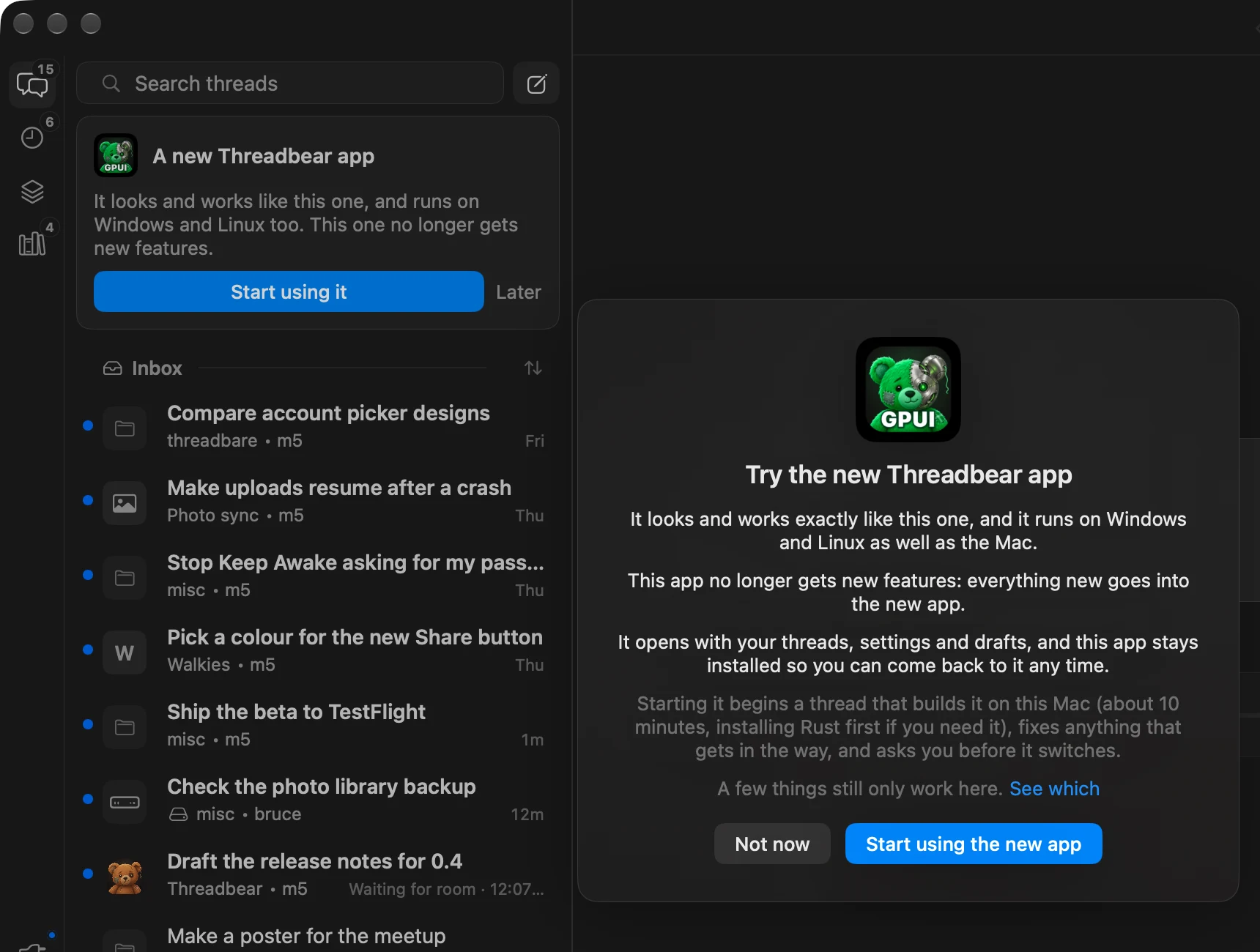
The new app for Mac, Windows and Linux is ready for everyone. The Mac app offers it once when it opens and keeps a card at the top of the sidebar: Start using it starts a thread that builds it, sorts out anything in the way and asks you before it switches. The old app stays installed.
Added
Open Anything
In the new app, ⌘K (or ⌘P) opens any thread, panel, project or page by typing a bit of its name. Return opens it, ⌘Return opens it beside. An experiment: turn it on in Settings > General > Experiments.
Added
Reinstall the runner from Updates
When the runner's own app needs reinstalling, the Updates panel has a Reinstall now button in place of a command to copy into a terminal. It waits until no thread is busy, then the runner restarts.
Changed
Spelling in the new app's message box
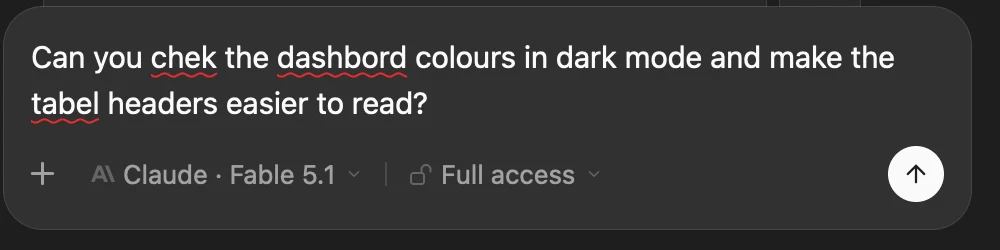
The new app's message box checks spelling as the old one did: red marks under misspelled words, the Mac's autocorrect and text replacements, and right-click for suggestions.
Added
The paw at work
While a thread works in the new app, the paw beside "Bear with me" flips, spins, kneads, waves or leaves a few prints, a different move every couple of seconds.
Added
A new thread's box drops into place
In the new app, the message box on a new thread drops down under the transcript when you send, and threads ease in as you open them.
Also new
- Self-hosting behind your own address: setup takes --url and --site-url, for when your own proxy, Tailscale or VPN already reaches the Mac
- Patches can see their thread's title and projects, so a panel can show in only the threads it's for
- With the Codex models on Full access, the runner answers Codex's own questions, so a thread never stops for Allow or Deny Thanks to Ian Macartney
- New threads can be told which open threads may already be on the same work, and to hand it over rather than do it twice (an experiment)
Also changed
- New threads start on the permission mode you last picked for one, as they already did for the model Thanks to Ian Macartney
- Picking another model from the menu after a usage limit carries on straight away, and an idle move says the new model starts from your next message Thanks to Ian Macartney
- The done card no longer lists the agent's own "Still open" lines, which never gave you anything to do; a job still running is checked instead
- The Run card on questions is gone: use the play button on a shell code block
- OpenCode and Cursor are standard, no longer an experiment: they turn up wherever they're installed and signed in
- Full sync is off for a new install and offered once, when a phone, browser or second Mac turns up and it would help
- Switching a thread to Full access allows the cards it's waiting on that Full wouldn't have asked
- An agent that snoozes until something happens is woken once it has, with a turn to check, not the first time someone mentions it
- A thread that moves to another login at a usage limit says so in a quiet line, in place of the limit's red error
- You can change the login of a thread on another machine from the Mac, and the phone and website say when a thread moved login
- The direct link between Macs (tb pair and Connect to other machines directly) is gone: other machines' threads have gone through Convex for over a week
- Renaming a thread that has more access than the agent asking now needs your OK
- The web runtime for panels keeps itself up to date with Chromium, and Updates says when it falls behind
- The new app swaps in its updates by handing over to the new build, each thread keeps its scroll place, and Updates says what the restart is waiting on with a countdown
- Panels in the new app move only by their title or tab; Settings > General > Move panels by their background turns the old way back on
- The new app caught up on more of the old one: the first-run tour, the Browser pane, Notion task boards, pictures of PDFs and videos on file cards, Highlights and Files side by side, a Full sync switch in Settings, and the side pane's open file coming back after a restart
Also fixed
- A thread whose page had an emoji cut in half by a long tool title sat on its spinner and never opened
- Messages sent just before pressing Stop could disappear
- Long notes in a thread ran off both sides instead of wrapping
- Claude Code installed with npm or Homebrew wasn't found unless it was also in ~/.local/bin
- A turn that failed on another machine showed as an empty reply
- A patch's command only got the first 64 KB of a command's output
- Security fixes: a project's app could open in Chrome's place, a crafted page or drag could hang the app, a second runner could make a moving thread look like it was on this Mac, part of a secret could reach Convex from a running job's line, and a malformed reply or setting could change logins or remove threads
Thursday 12 November 2026
8 new, 13 changed, 13 fixed · Every change
Added
Another lab's review, finding by finding
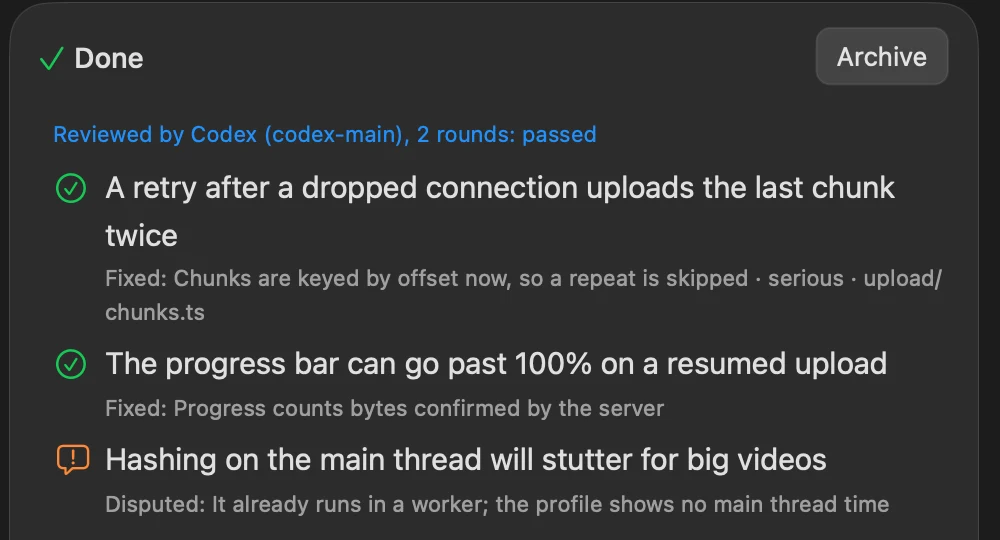
When your other provider reviews a thread's change, each thing it finds gets a number, and the thread has to answer every one: fixed, disputed with why, or left for you. The done card lists them with what was done, and the phone and website show them too.
Added
Parts of a project
A project can be a part of another: Make a Part of in the project's menu. A part folds under its parent in the sidebar and is listed on the parent's page, and its threads are told the parent's goals as well as its own.
Changed
Projects: a row each, and tabs on the page
With the Decisions experiment on, the sidebar's Projects list is one row a project, with its decisions or thread count, and its arrow shows the threads. A project's page has Decisions and Project tabs; ⇧⌘[ and ⇧⌘] step between them.
Changed
Usage's weekly charts show the whole week
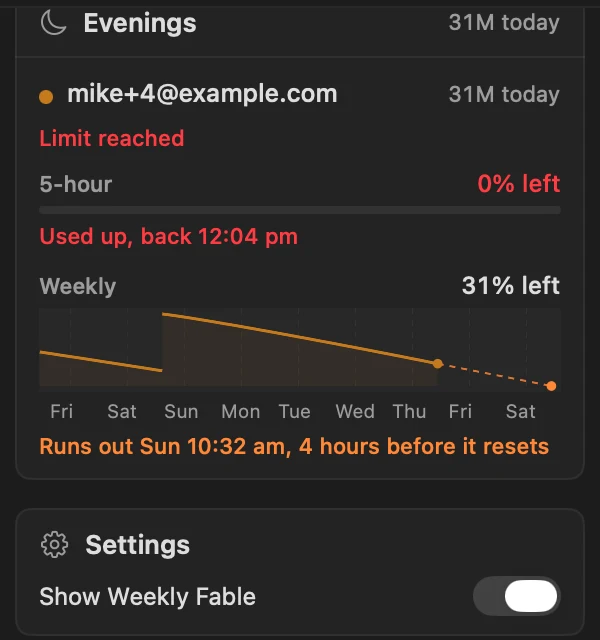
Each login's weekly chart in the Usage panel shows the last seven days with their names along the bottom, and breaks the line where the week reset. A switch in the panel's Settings card hides Weekly Fable.
Also new
- Search finds a thread by what it's about, not just its title: the librarian gives each thread a few search words, so "dentist" finds "Wisdom tooth meeting location". On the phone, search also looks through every message
- The phone app shows a plan in full: a plan card that opens it in a sheet, with Copy and Share, and Go ahead on Claude's plan card Thanks to Wayne Sutton
- Click a picture's chip or thumbnail in the message box to look at it in Quick Look
- Schedule… in the message box's + menu opens a new schedule with what you've typed
- A link to another site in a patch's panel opens in your browser (or over the panel, as your web links setting says), and the panel's bar gets a Back button
- A quiet inbox: threads another thread started archive themselves once they're finished, and a thread waiting only on its helpers hibernates until they're done (an experiment)
Also changed
- Move to another machine is on for everyone, no longer an experiment
- Reply buttons, schedule checks and standing instructions are on for everyone, no longer experiments
- The recap box on threads quiet for 12 hours is gone, after a day of trying it
- A pool thread that ran out of room carries on as soon as any login in its pool has room again, and a login is used down to 1% left rather than 10%
- The agent hears which of its reply buttons you pressed, so it doesn't do the same job again
- Pasting several lines into the Terminal asks first, when the shell would run each line as it arrived
- Builds and tests Threadbear starts run at low priority rather than in the background, which was far too slow on some Macs; jobPriority in runner.json picks Thanks to Ville Lahdenvuo-Malta
- The runner starts a couple of seconds faster
- Messages from Android say they came from the phone app, not the iPhone app
- The done card counts work pushed to a branch but not merged as still open (with the loose ends experiment on)
- The new app for Mac, Windows and Linux (an experiment) caught up on most of this one: the Terminal, Settings, Scheduled, Usage, the options review window, the limit box, videos and PDFs in the side pane, panels that glide, and sends that wait out a runner restart. It also shows the model a sub-agent runs on, keeps your last 24 threads ready so switching back is instant, and installs its updates by itself
Also fixed
- Closing the Terminal could leave the thread blank until you switched threads
- An archived thread could leave a gap in the inbox for a few seconds on a busy Mac
- The context ring's popover could run down past the bottom of the window
- The slash command list stays on the screen the message box is on, and goes under the box when there's more room there Thanks to Wayne Sutton
- A long wait line between turns stays on one line
- A long project name in the sidebar no longer runs under a row's hover buttons
- A home patch could make an Auto thread ask before every file edit; now only the commands it really runs count, and the card says which patch Thanks to Ville Lahdenvuo-Malta
- Two logins on the same email in a shared pool are no longer merged into one Thanks to UomoMacchina
- Joining a second Mac: tb is on the PATH, the host name it prints works, and ssh failures say what went wrong Thanks to Wayne Sutton
- Picking another login or folder between turns no longer stops the agent's sub-agents
- On Windows, the new app names files by their normal drive path, so links to files open there Thanks to Platima
- Threadbear's guard on its own secrets folder caught fewer spellings than it should: other capital letters, and the runner's home variable Thanks to Platima
- Closed several security holes, including a schedule edit that could approve a changed check, a repository's own git settings running from the done card's check, and a web panel's page opening browser tabs by itself
Wednesday 11 November 2026
20 new, 20 changed, 21 fixed · Every change
Added
A Terminal under each thread
View > Show Terminal (⌘J) opens your own shell in the thread's folder, and each thread keeps its own. A shell command in a reply has a play icon that puts it at the prompt, for you to read before pressing Return. Thanks to Mup
Added
Answer a project's decisions in one place
A project's page starts with every question its threads are waiting on, and each answer goes to its thread as if you'd answered it there. It's an experiment: turn on Decisions on the Projects page in Settings > General > Experiments.
Changed
Slash commands in a new thread, and partway through a message
Typing / in a new thread's box lists its commands and skills before the first message. Type / after a space anywhere in a message and it lists the skills the agent can use there, and Tab puts one in. Thanks to David Clark
Changed
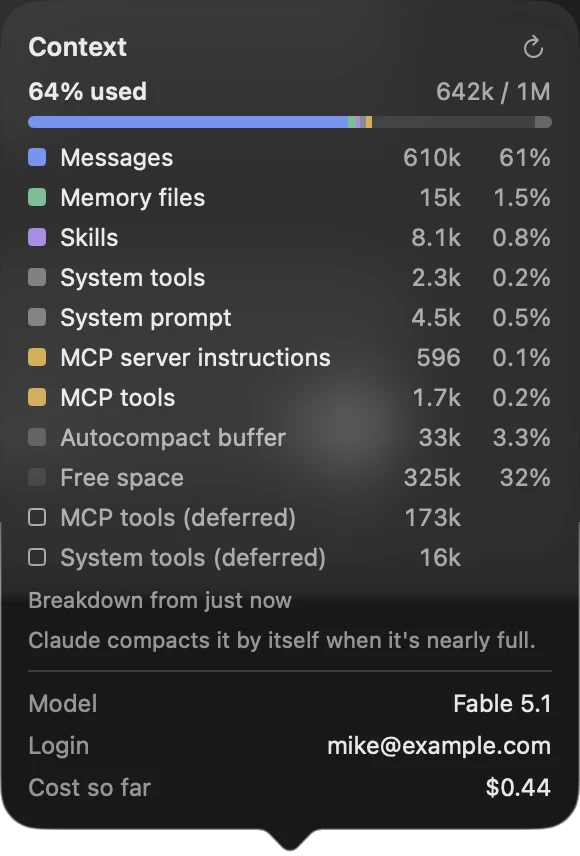
See what fills a Claude thread's context
Click the context ring by the message box to see what's taking up the room: messages, memory files, skills, tools and the rest, each with its share, and a button to count again.
Changed
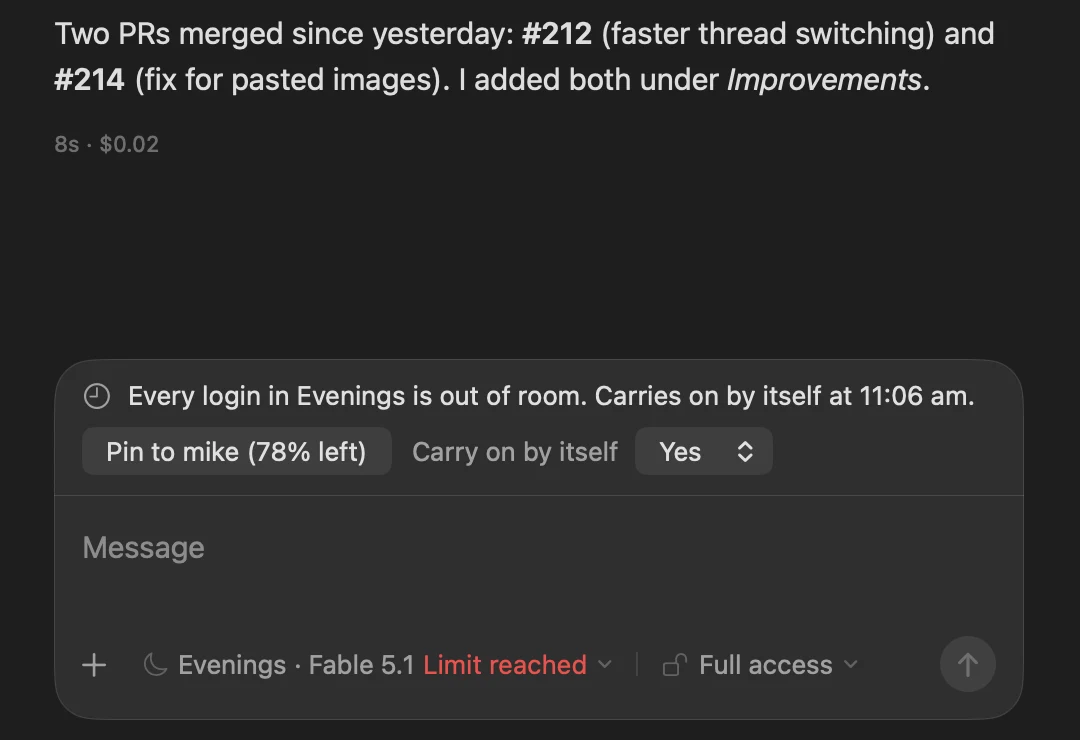
A box by the message box when a login hits its limit
The bar across the top of the thread is now a box above the message box saying what happened, with a button to switch to the login with the most room. A thread pinned to one login now carries on by itself once it resets, as pool threads already did, unless you set Carry on by itself to No.
Changed
Send while the runner restarts
A message sent while the runner restarts waits at the end of the thread, dimmed, with "Runner restarting. Sends when it's back." under it, and goes as soon as the runner is back. It used to bounce back into the box.
Added
Fold the Threads panel away with ⌘/
View > Collapse Threads (⌘/) gives the thread the panel's room and keeps the icons down the left. Press ⌘/ again, or click one of those icons, and it comes back at the same width. Thanks to Wayne Sutton
Changed
Settings has a sidebar
Settings lists its sections down the left, as System Settings does, and each one scrolls, so General no longer runs off a laptop screen. You can drag the window wider and taller.
Added
Back and forward arrows
Arrows beside Share in a thread's bar step back and forward through the threads you've had open. Hover over one to see where it goes. Thanks to Wayne Sutton
Added
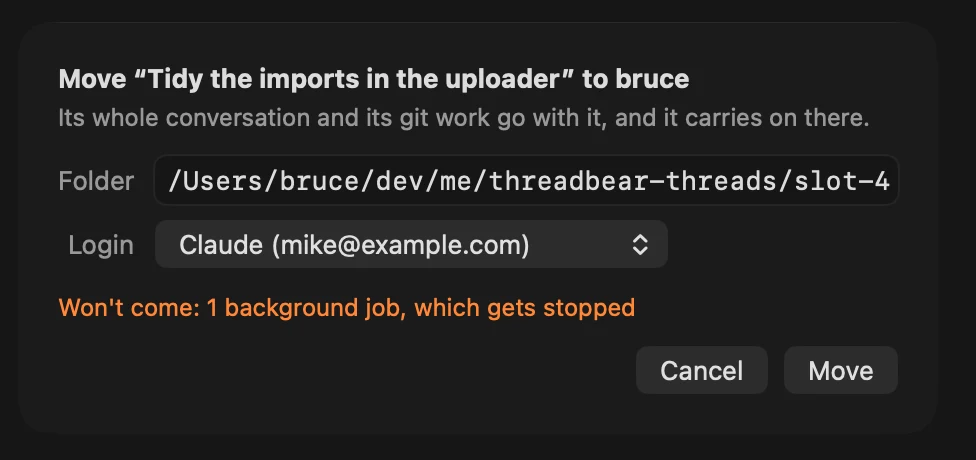
Move a thread to another machine
Move to in a thread's right-click menu sends it to another of your machines, with its conversation, pictures and git work. It's an experiment.
Added
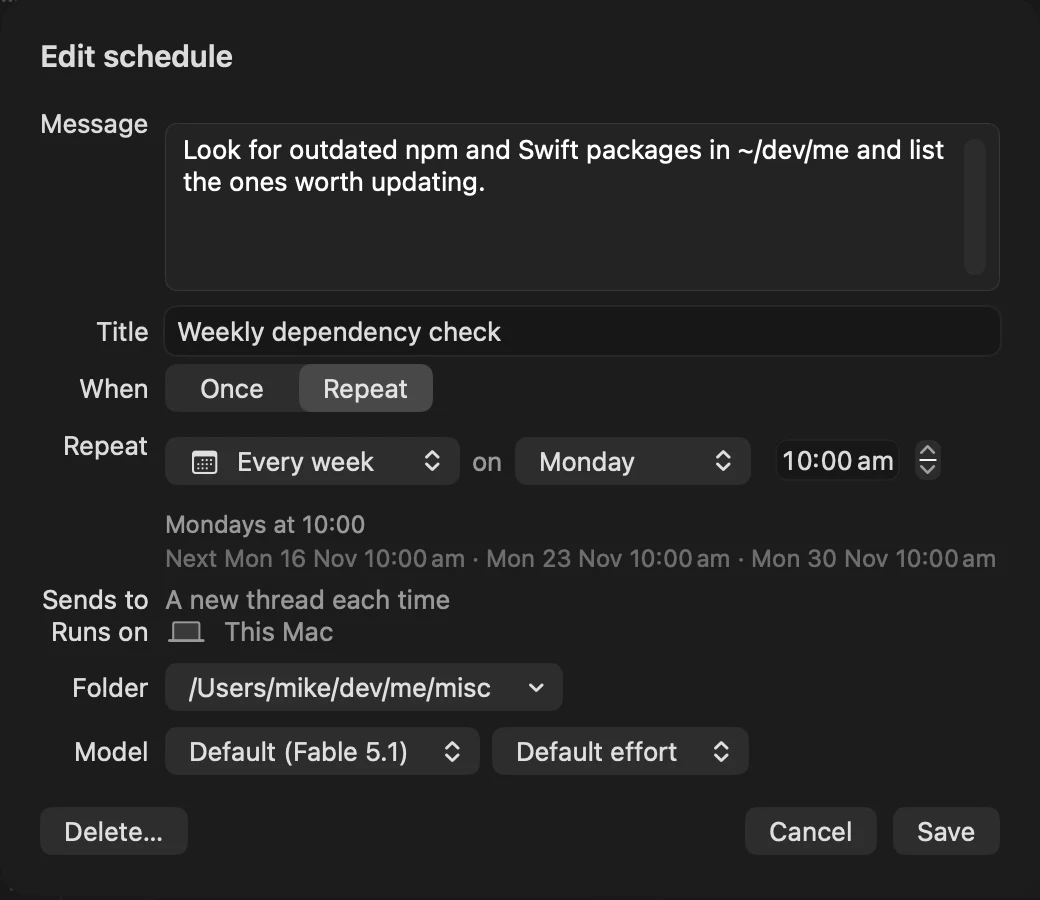
A schedule's model and effort
Pick a schedule's model and effort in its editor.
Added
Which machine a thread is on
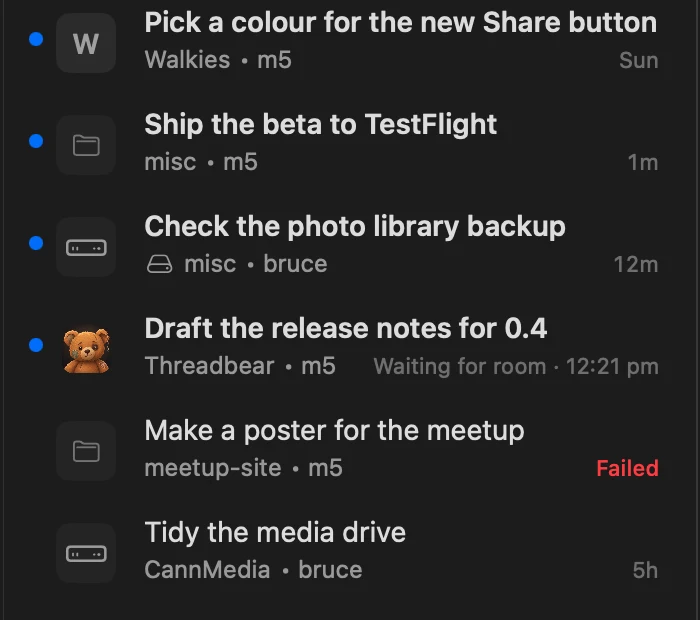
With more than one runner, each thread in the sidebar names its machine after its project.
Also new
- Stop a running thread from the iPhone app or the website: Send turns into Stop while it works, as on the Mac
- ⌘Q asks before quitting, with a Don't ask again box, and Settings > General > Quitting turns the question back on Thanks to Wayne Sutton
- Settings > General > Experiments has a switch for each experiment, with what it does behind its ⓘ Thanks to Wayne Sutton
- Right-click a picture in the side pane for Show in Finder and Copy Path Thanks to Mup
- Write to a thread 12 hours or more after its last turn and the agent is asked to start with a short recap of what the thread was for
- A patch can name a teardown command that runs when its thread's worktree is cleaned up, for things its setup made outside the folder (a Convex deployment per worktree, say)
- Threadbear can run other tools' update commands once a day, listed under
cliUpdates.extrain runner.json - A What's new page on the website, with each day's release Thanks to Wayne Sutton, whose fork's changelog it's modelled on
- Run OpenCode and Cursor threads next to Claude and Codex (an experiment)
- On Auto, a reviewer looks at approval cards first, lets through the ones that fit the thread's task and sends the rest to you with its reason (an experiment)
- An agent can put a command on its card that runs with one press on the thread's machine, with the output going straight back to the agent (an experiment)
- Open a thread that's been quiet for 12 hours and a box above the message box says what it's for and where it stands (an experiment)
- An early build of a new app for Mac, Windows and Linux, to try beside this one; it doesn't do everything yet (an experiment)
Also changed
- Keeping the Mac awake while threads work is on for everyone now, with a switch in Settings > General > Sleep
- When a thread that changed code finishes, your other provider tries to break the change: this was an experiment and is now on for everyone, with Settings > General > Code review to turn it off
- Every agent knows it can draw diagrams and small pages in its replies, which was an experiment before
- New installs start threads on Auto, while existing installs keep Full access Thanks to David Clark, Yuri and nennat, who each made the same change
- File edits can only be allowed in the Mac app: on the phone and the website their cards offer Deny and say to allow them on the Mac
- A permission card says why it's asking (Auto's safety check couldn't clear a command, say), and a call Auto refuses without asking says why in the thread Thanks to David Clark
- Permission cards show tabs as ⇥ and spaces at the end of a line as ·, and say when a file being written doesn't end with a line break
- The agent's own pick on a question card is a small gold star and Recommended, in place of the blue "my pick"
- On the iPhone and the website, a question card shows what each answer does under it, as on the Mac
- The footer under each turn shows tokens out and in, for Codex turns too, with the API price when you hover over it, where it used to show a dollar cost
- A Markdown file in the side pane has a Preview / Markdown menu in its bar in place of the pencil, and the drawn page keeps its lines to a readable width Thanks to Wayne Sutton
- The side pane's bar names a file by its own name, with its full path when you hover over it Thanks to David Clark
- Attach Image takes Markdown files too, which go in as their path Thanks to Wayne Sutton
- A clip enlarged in the options window plays with its sound on
- With natural scrolling off, a two-finger swipe over a sidebar row goes Back rather than archiving the thread, and a swipe has to go a little further before it counts
Also fixed
- A message sent just as the runner restarted could be lost: it now goes again once the runner is back, or comes back into the box with a note saying so
- Dragging the edge of the Settings window could crash the app
- A small picture in the options window could crash the app as the window opened
- Long option descriptions on question cards wrap instead of being cut off after one line Thanks to Wayne Sutton
- Pictures and links to files in folders with spaces in their names (Application Support, say) show as pictures and links, not as raw text Thanks to Mup
- In a narrow window, panels stay inside their space instead of hanging off both sides with their text showing through the bars Thanks to Wayne Sutton
- From the Mac, reply buttons and slash commands work on threads running on another machine
- On iPhone, the done card and its follow-ups show for agents that write their reply before finishing the turn, as Codex does
- On the iPhone and the website, a thread that said it needs nothing from you counts as done, as on the Mac, and no longer adds to the phone's badge
- Shared thread pages scroll back past the newest 2,000 messages and keep your place while older ones load
- Scrolling back through a long thread on the iPhone no longer reads so much from the backend that it could use up a free plan's daily allowance
- The iPhone app no longer fails to open a thread holding a message it doesn't recognise
- A thread on a permission mode the Mac app doesn't know shows as Unknown mode, where it used to show as Full access
- A daily schedule could run twice when the network dropped as it ran, and a deleted schedule could come back after the disk filled up
- One mistake in runner.json (a stray comma, say) could get it written over, losing your logins and settings: the runner now stops and says what's wrong
- A thread that archives or snoozes itself waits while one of its cards is still open, so the work waiting on that card isn't stopped
- The agent doesn't offer an option you passed over in an options review as a new follow-up
- Waking the Mac no longer starts a "needs someone at its screen" thread because of a notification window that isn't showing Thanks to David Clark
- A runner update that failed because its machine ran short of something (disk space, say) is tried again once the machine recovers
- Setup and builds work on more Macs: with only the Command Line Tools, with Node from Homebrew, with a company registry in ~/.npmrc, or with two signing certificates of the same name Thanks to Michał Frączek, Gabriel Bressan, David Clark and Yair Haimo
- Closed several security holes, including ways a thread on Ask or Auto could get more access through Threadbear's own commands, a folder's git settings could run a program before you'd trusted the folder, and an approval from the phone could allow more than its card showed
Monday 9 November 2026
6 new, 11 changed, 12 fixed · Every change
Changed
Trackpad swipes show where you'll land
Swipe back or forward with two fingers and a card in the middle of the window names the thread or page you'll go to, filling as your fingers move and turning blue once letting go will take you there. Which way is Back now follows your natural scrolling setting, as in Safari.
Changed
Answer several permission asks on one card
When a Claude agent wants to do several things that need your OK at once, they come on one card with a tick and a cross on each. Allow lets the ticked ones through and refuses the rest, and Deny all refuses them all.
Added
Start a thread from a project's page
New Thread at the top of a project's page opens the message box in the project's folder, and the agent knows the project's goals and notes from its first message. Thanks to Wayne Sutton
Added
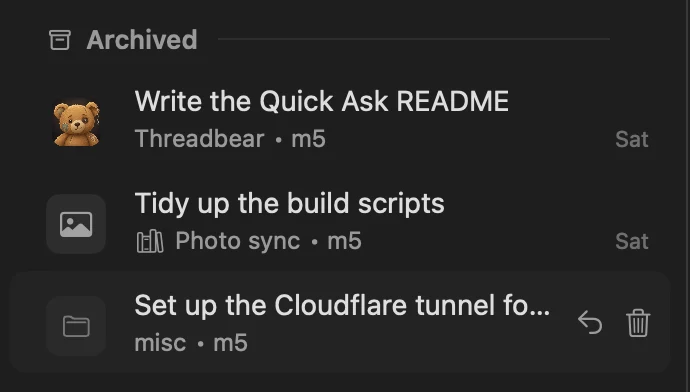
Delete an archived thread
Hover a thread under Archived and click the trash, or right-click it and choose Delete…, then confirm. Thanks to emilsbauga
Changed
Back skips the new-thread screen
Back from a thread you just started goes to wherever you were before you pressed New thread, not to the empty new-thread screen.
Fixed
Pinned pages always open
A page an agent pins to show you opens in the side pane every time, or as soon as you go back to that thread.
Also new
- Send pictures to a thread running on another Mac or a cloud server, where it used to say pictures couldn't go there yet
- On iPhone, type / in a thread's reply box to pick from its slash commands
- On iPhone, the photos you sent show above your message, where it used to say "[2 pictures]"
- On iPhone, swipe left on a thread to go forward again to the thread you just went back from
Also changed
- The arrows on a diagram or small page in a reply open it full size in a window of its own, where they used to open it in the side pane
- A swipe with nowhere to go says so, and a swipe has to go a little further before it counts
- The browser panel lists the pages an agent has open, each with a picture of the page, what the agent is doing there and Show window to bring the real window forward
- The Runners panel lists your runners in the same order as Settings and the phone, and you can drag them into a new order there
- A patch's button can change its own label (say, "Merge #707"), and a patch's buttons update as soon as one of its commands finishes, so a Run can turn into Stop straight away Thanks to Elie Hamouche
- Voice mode (talking with a thread out loud, an experiment you had to turn on) is gone from the Mac app; dictation on the iPhone stays
- The iPhone reads much less from your backend to know which threads a schedule will wake
- On iPhone, the microphone's bars move with your voice
Also fixed
- Pasting a screenshot you took to the clipboard with ⌃⇧⌘4 works in the message box and a Needs you card's answer box, where Paste was greyed out and ⌘V did nothing (other pictures already pasted fine) Thanks to Mup
- On iPhone, scroll back through all of a long thread: past the newest 2,000 messages it used to say Loading… for good, and loading earlier messages now keeps your place, even mid-flick
- On iPhone, the Starred, Inbox and Running headings stay at the top again while you scroll, and pictures near the top bar or reply box no longer go blank
- A schedule keeps the message box's permission mode, Auto included, where a schedule made on Auto used to stop and ask before every edit Thanks to David Clark
- Hibernate until… with words works on threads running on another Mac Thanks to jwsandeman
- A decision card from a thread on another runner shows what each answer does, as your own runner's cards do
- A thread another Mac asks to start here, with a folder named under that Mac's home folder, starts in the matching folder here, and the card says so when there's no such folder
- A thread still finishing on a runner that's being replaced by an update can still message threads on your other runners, and its last saves are no longer lost
- A thread brought back from the archive never carries on in a worktree folder that has since gone to another thread
- The app menu has one Settings… item instead of two Thanks to David Clark
- Closed several security holes, including a stopped share link that could still show newer messages, a repo's icon that could make a Linux runner run a script, and ways text from another runner or repo could get past an approval check
Saturday 7 November 2026
27 new, 20 changed, 14 fixed · Every change
Added
Type / for a palette of commands
Type / in a thread's message box and a palette opens above it with Threadbear's commands, the agent's own and your skills, each with how to use it. Up and Down pick one, Return runs it and Tab fills it in.
Added
See how full a thread's context is
A small ring beside Send fills as the conversation uses up the model's context, and turns orange when it's nearly full. Click it for the tokens used, the model and login the thread ran on, and what it has cost.
Added
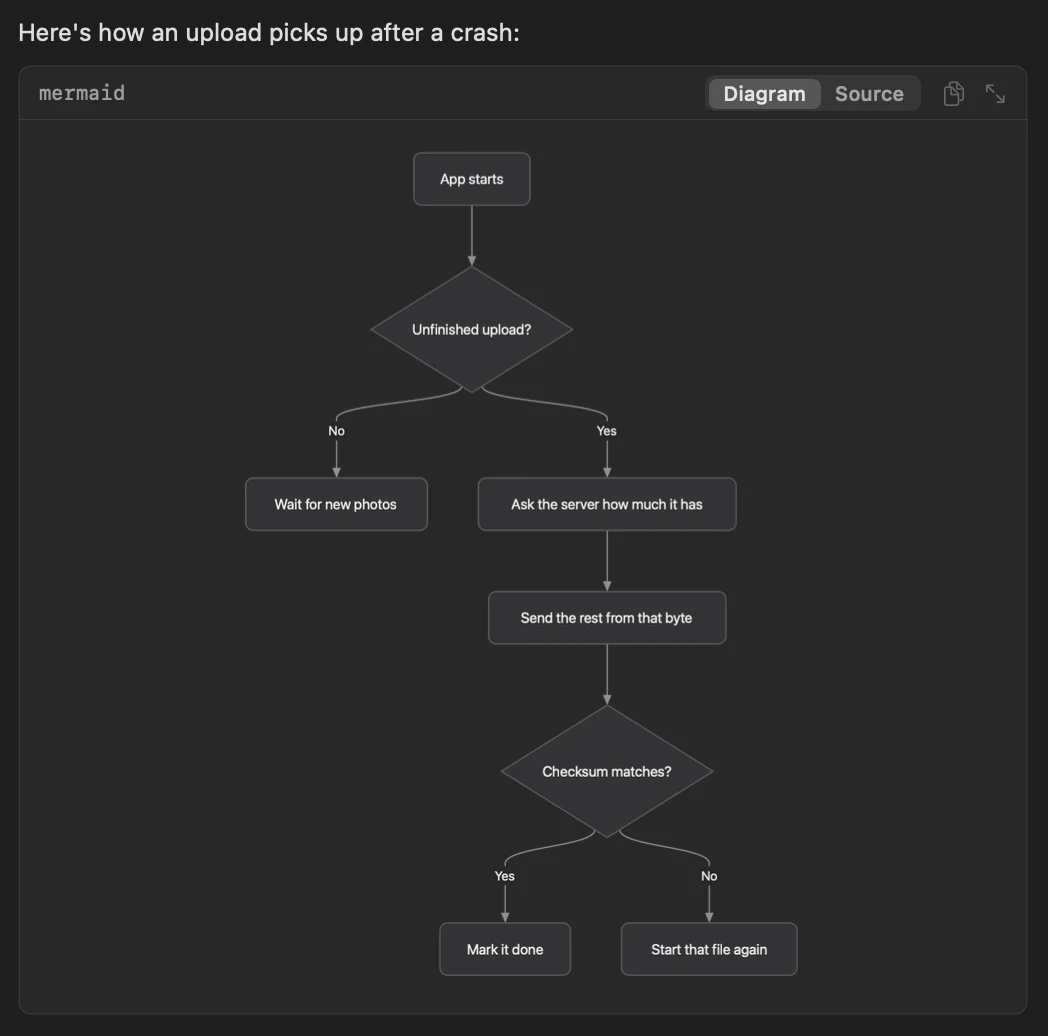
Diagrams and small pages in replies
When an agent puts a diagram or a small web page in its reply, it's drawn right in the thread, on the Mac and the iPhone. The switch on its box shows the code instead.
Changed
Hibernate tucks a thread in
Hibernating the open thread sinks it down into the moon by the Hibernating heading, on the Mac and the iPhone.
Changed
The bear, redrawn
The bear looks more like a bear, with a button eye and a stitch. Clear your Inbox and it pops up over the empty page to wave, and from 1 to 26 December it wears a Santa hat.
Added
Change any keyboard shortcut
In Settings > Keyboard, click a command's key and press the one you want. If another command already has it, it asks first.
Added
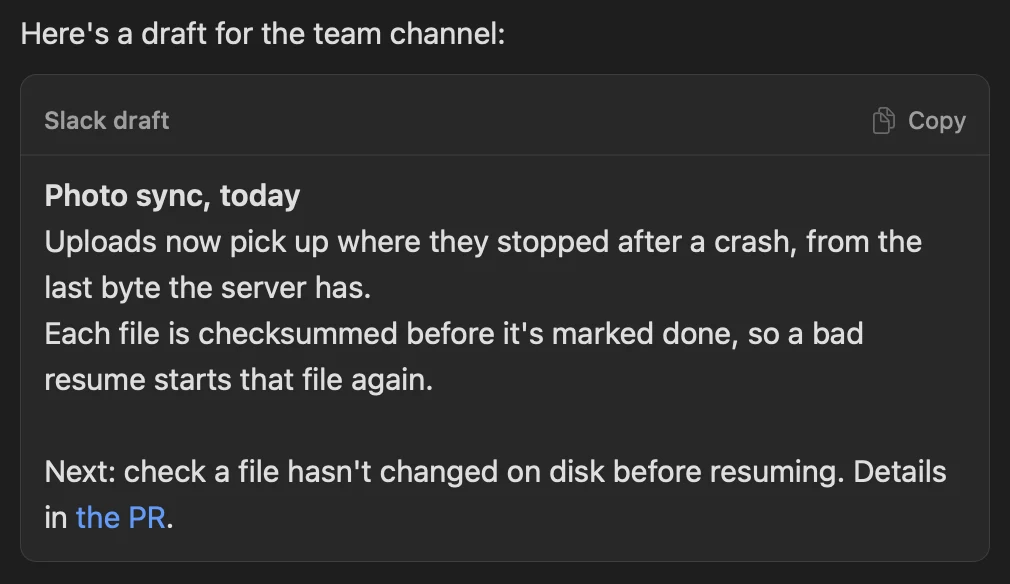
Drafts that paste as they look
A Slack message or email an agent writes for you shows in a box line for line, as it'll go out, on the Mac, the iPhone and the website. Copy at its top right keeps the bold and the links.
Changed
Questions slide past like a deck
When a card asks several things, answering one slides the next in from the right.
Added
Swipe between threads
Swipe left or right with two fingers to go Back and Forward between threads, as in Safari.
Changed
Sent messages lift off
A message you send lifts off the message box, and the done card's tick draws itself in.
Changed
The bear sleeps at night
Between 10 pm and 5 am the bear under an empty Inbox is asleep. A thread that wakes from hibernating has the bear stretching beside its note.
Added
About Threadbear waves
Threadbear > About Threadbear opens a small window where the bear waves over a few numbers from your threads.
Also new
- Plan first in the mode menu on the message box: the agent looks around and writes a plan without changing anything, as a card with Go ahead and Send back, and ticks off its steps on the same card once you let it start
- Pick Light, Dark or Same as the Mac for Threadbear alone in Settings > General > Appearance Thanks to Wayne Sutton
- A soft ding when a thread finishes, waits for you or fails: choose Chime, Bell or Droplet in Settings > General > Notifications (off until you turn it on) Thanks to Wayne Sutton
- ⌥⌘↓ (Go > Next Inbox Thread) opens the next thread in your Inbox, so you can work through it without the mouse Thanks to Tyler Lusk
- Drag a thread from the sidebar onto the open thread to mention it in your message
- Investigate on the error bar starts a thread that looks for the error's cause and fixes it
- When Claude refuses a message, Continue with Codex Sol carries the thread on in Codex
- Files on a thread's right-hand rail shows the thread's folder in the folder browser Thanks to Wayne Sutton
- A thread's Highlights lists the threads it started, with where each is up to, and a click opens one
- A page in the side pane that needs its scripts says so, and Run them turns them on for that version of the file, still with no internet
- Options an agent asks you to compare can be videos and small pages as well as pictures, and the one it would pick is marked "my pick"
- The Usage panel has a meter and chart of its own for Fable's weekly limit
- A note, once, when you pass 1,000 threads
- iPhone: a mic beside Send in a thread's reply box, with Whisper as an option for more accurate dictation and a word list for names in Settings
- iPhone: choose which Mac a new thread runs on, and set the order they're tried in under Settings > Runners, on the phone or the Mac
- iPhone: messages sent while the thread's Mac is asleep show faded with Cancel until that Mac takes them
- iPhone: Copy Thread ID in a thread's ... menu, and a pasted thread id goes in as a link to that thread
- Run Threadbear on your own Convex backend instead of Convex's cloud with
./threadbear setup --self-hosted - Your own copy of Threadbear starts a thread every five days to bring in the newest releases, and straight away for an important one: Settings > General > Updates from Mike sets how often
- New experiments you can switch on (the guide's Experiments page says how): keep the Mac awake while threads work, have Codex review Claude's changes and Claude review Codex's, skip a scheduled run when its check finds nothing new, a done card that lists loose ends, buttons in replies, instructions for every agent in Settings, and talking with a thread out loud Thanks to Wayne Sutton, for instructions and talking out loud
Also changed
- Editing a file in the side pane shows line numbers, ⌘S saves it straight away, and a save never writes over a change an agent has just made to the file Thanks to Wayne Sutton
- Slash commands work in Codex threads too, and
/modeland/effortstay set for the thread - Copy thread id is on a thread's right-click menu in the sidebar as well as its ... menu
- Usage on the left-hand rail is a honey pot, filled to how much is left on the login your next thread would use
- Every button shows a spinner or the change straight away, and can't be pressed twice while it waits, on the Mac and the iPhone
- Drop a file anywhere over the thread to attach it, not just on the message box Thanks to Jamie Turner
- A link's right-click menu has Open in Chrome for each Chrome profile you have open, so a page can go to the window with the right sign-in
- Web addresses inside code in a reply are links Thanks to Wayne Sutton
- Archive on the done card archives straight away again, without asking whether it worked
- A failed update starts a thread in the background that fixes the cause and archives itself; the banner is only for when no thread can start
- Checks, worktree setup and updates that Threadbear runs itself go at background priority, so the Mac stays responsive
- A scheduled run that finds nothing for you puts an archived thread back in the archive
- On the iPhone and the website, a hibernating thread's row says what it's waiting for
- iPhone: pull the Inbox down and the bear peeks over the top while it reconnects, and clear the last row for a wave
- iPhone: while you dictate, the reply box is a waveform with the time so far and a small stop button
Also fixed
- Screenshots dragged from their floating thumbnail and photos copied from Photos now attach Thanks to Tyler Lusk
- A link in a reply to a file in the thread's folder opens that file
- A link to a thread the sidebar doesn't have says why, rather than only beeping
- Return in a question's Something else box moves on to the next question, and an empty box no longer counts as an answer
- Picks on a card work while the thread is busy with a background task
- A sub-agent's permission card stays up after its parent's turn ends, rather than the sub-agent being stopped as if you'd said no
- Ask before edits threads no longer ask before Threadbear's own tools that only read or show you something
- Answering or archiving while the runner restarts no longer fails with "Thread not found"
- Cards on a thread that runs on another Mac can be answered, and its archived threads can be reopened from Archived
- iPhone: tapping a notification no longer crashes the app, and opens its thread even when the app wasn't running
- A mockup page saved without a character set no longer shows ✓ as garbled letters
- Granting Full Disk Access after Threadbear first asked for it clears the notice Thanks to Josh Gantt
- Your own copy no longer shows Mike's Sentry and App Store Connect chips Thanks to Wayne Sutton
- Closed several ways a cloned repo's settings, a stopped share link or a tampered release could get past Threadbear's checks
Friday 6 November 2026
10 new, 16 changed, 10 fixed · Every change
Added
Browse folders in the side pane
A link to a folder now opens it in the side pane, as a list with sortable columns or as icons with thumbnails, much like the Finder. Double-click to go in or preview a file, press Space for Quick Look and ⌘↑ to go up, and drag files out to other apps.
Added
A Runners panel on the left-hand rail
With more than one runner, the rack icon near the foot of the rail lists each machine, whether it's online, the release it's on and the threads it's running. Click a runner's name for its CPU, memory and disk.
Changed
Paste a thread's id to link to it
Use Copy thread id, then paste it into another thread's message box: it goes in as a chip with that thread's title, and clicking the chip in your sent message opens the thread.
Changed
A cloned repo's hooks wait for you
When a folder's own Claude Code settings bring hooks, MCP servers or a different API address, Claude starts without them until you trust them. A Hooks to trust chip above the message box opens Patches, which lists every file trusting would cover.
Changed
Logos in the model picker
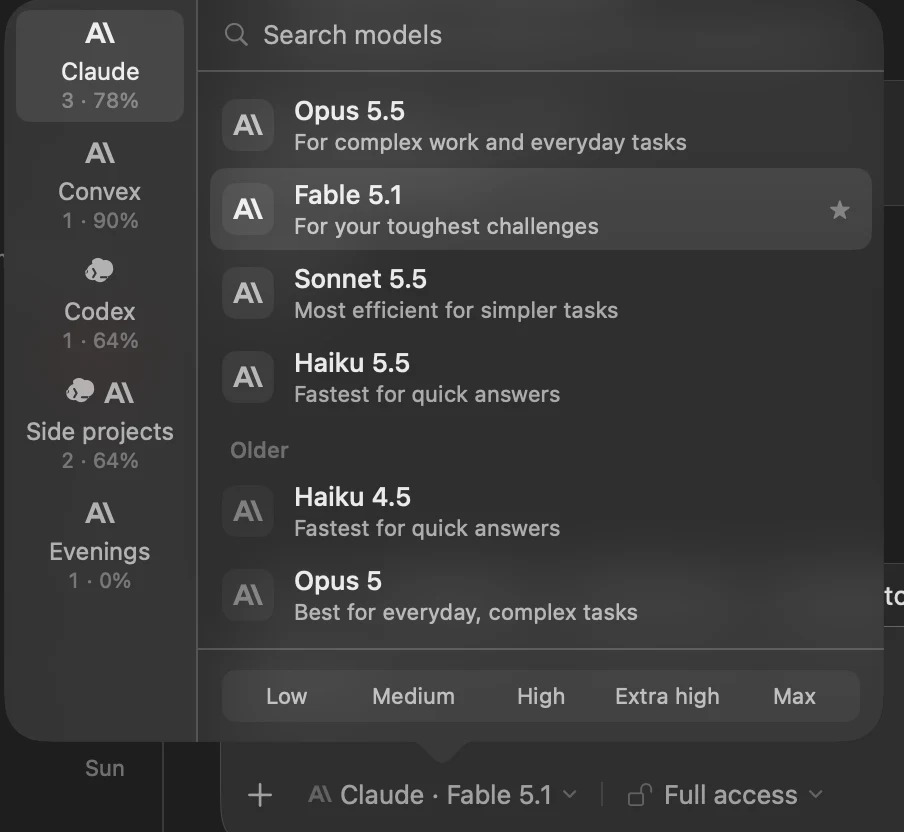
The model picker shows the Anthropic and Codex logos beside their models and over each pool, and the model chip under the message box leads with the logo too.
Changed
Usage says what each pace means
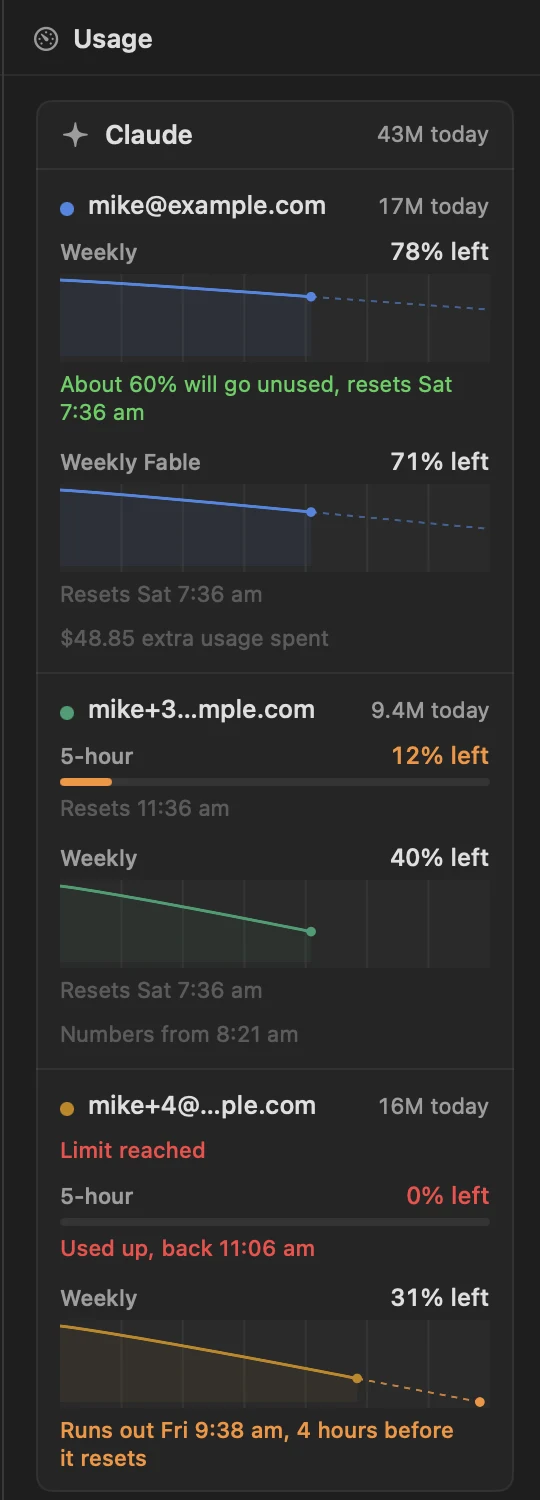
Each limit in the Usage panel now says how long before its reset it would run out at this rate, about how much of it will go unused, or that it's on track. The charts also fill the panel's width now.
Added
A card about pools
The first time a pool gets a second login, a card by the message box explains what pools do.
Added
Headings in patch list panels
A list panel from a patch can group its rows under headings, end a row with a date or count, and show two lines of detail.
Changed
Zoom into a big picture when comparing
In the window for comparing options, scroll or pinch to zoom, drag to move around, and jump about with a small map of the whole page.
Changed
Settings explain themselves
Each Settings section has an ⓘ that says what it's for and what to ask your agent if you want it changed.
Also new
- Archive on a done card asks how it went: Worked, Didn't work, Not needed, or Okey-dokey for a thread that's simply done (Mac, iPhone and website)
- A thread that's waiting on other threads hibernates until they finish, then carries on with what they said, and its row says Waiting on and which
- The Browser panel (the globe on a thread's right-hand rail) shows the pages an agent opens through BrowserBear in your own Chrome profile, and you can click and type in them there; when the agent needs you to sign in or approve something, the page opens in the panel with Your turn and Done
- Run a schedule on a pool, so each run starts on whichever login has room
- The website has a rail down the left for Threads, Scheduled, Projects, Runners and Usage, where you can see each runner's CPU, memory and disk, and Pause or Run now a schedule
- Run Threadbear's runner on a Linux server, where it installs as a background service
Also changed
- Threads on your other Macs and servers open from this Mac without pairing it with each one first
- Pools are shared between all your runners, every machine sees each login's latest usage, and new threads start on the login whose week resets soonest, so less of each week goes unused
- HTML files previewed in the side pane show as static pages: their scripts don't run, and they can load only the styles, pictures and fonts they name
- A link to a Tandem project opens it in Tandem instead of the side pane
- A thread's ... menu has Open on the web
- Agents can change a scheduled thread's login, folder and model
- The website's sidebar can be resized, every section folds and shows its count, the inbox sorts, and search and filters reach archived threads too
- Pictures you paste into a message now show on the website, and a project's page there lists all its threads, archived ones too
- Threadbear sends and reads far less in your Convex backend, and scrubs keys and passwords from what it sends
- The homepage plays clips of the app, installing is copying one prompt into Claude Code or Codex, and the code is now public on GitHub
Also fixed
- Icons now show in menus, which macOS had been hiding
- Clicking a picture in the side pane no longer crashes the app
- A thread whose last turn was very long no longer opens halfway down with nothing above it
- A message sent while the runner restarts now waits and goes through, rather than bouncing back to the message box with an error
- The app no longer freezes for several seconds while a card of questions or a long row of action buttons is showing
- On the iPhone, very large pictures and long GIFs are scaled down and capped, so a thread full of them can't run the phone out of memory
- A runner whose key the backend turns down now says so in the app and in
tb status, and picks up a new key once you add one - Setting up a fork copes with an expired GitHub login, and the dry run lists your Convex teams
- Closed several ways a cloned repo, a link, a shared page or another machine could get past an approval check or reach your files, and the iPhone now asks before any pairing or Quick Ask link changes which server it uses
- A phone you've revoked stops getting notifications
Thursday 5 November 2026
4 new, 6 changed, 3 fixed · Every change
Added
Give an agent a password without it going in the thread
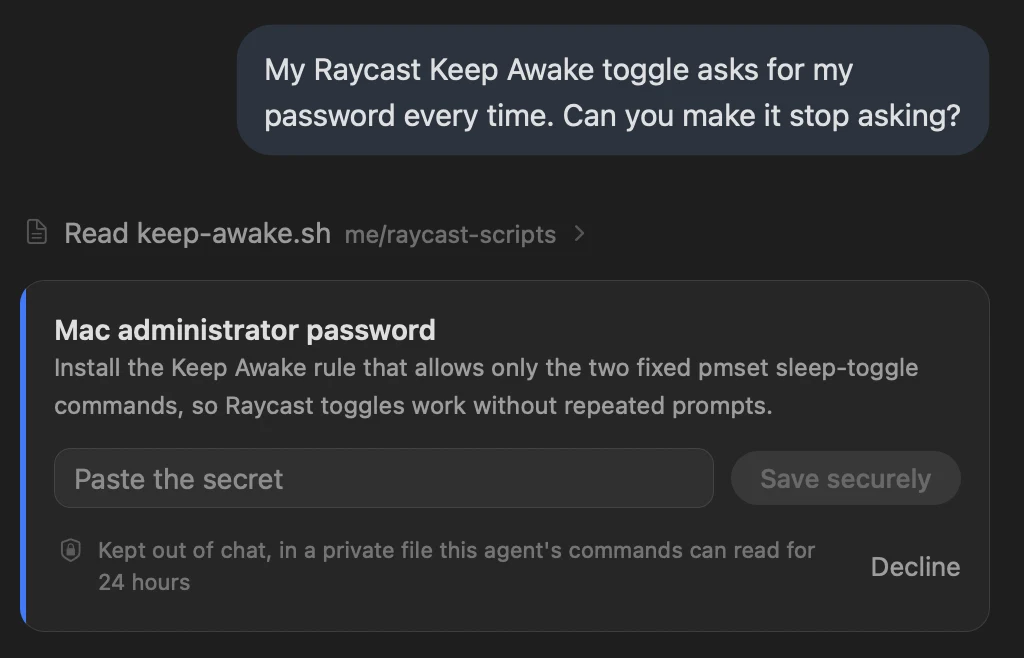
When an agent needs a password or key, it asks with a private card on the Mac or iPhone. What you type goes only to the computer running the agent, never into the thread, and it's deleted after 24 hours.
Changed
Pick several options, or none
In the options window, tick as many options as you like, or None, and answer them all in one reply box. Each option's screenshots now sit together, and holding Space shows today's version in place of the one on show.
Changed
Thread rows name their project again
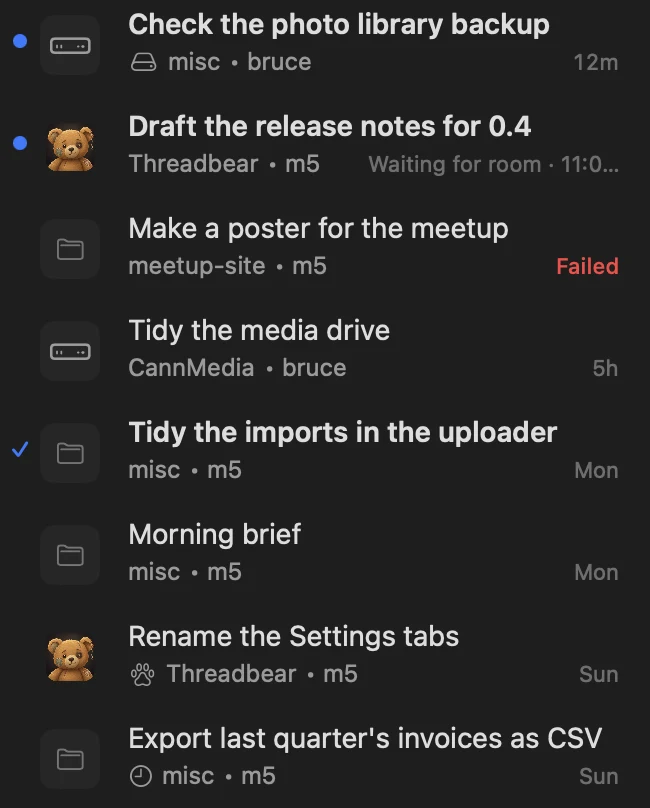
The grey line under each thread's title names its project or folder again. A thread that a schedule, a tool or another agent started has a small mark first: hover it to see who started it and why.
Fixed
Paths with spaces are links
A file path with spaces in an agent's reply, like exports/Launch Poster.png, is a link now, so you can open it like any other path.
Also new
- A thread that was mid-reply when your Mac restarted or Threadbear crashed carries on where it stopped
- Middle-click a link in a thread to open it, as a click does
- Threadbear's code is public under the MIT licence, with a guide to making your own copy
Also changed
- A thread waiting for the internet to come back says Waiting for connection on its row, on the Mac and iPhone, where it used to say Failed
- Editing a message you just sent asks first when the thread has work running in the background, since going back stops it
- Copying from a thread keeps its links, bold, italic and code when you paste into Slack or a web page, where links used to come out as plain words
- On the iPhone, your answer to an options review shows each pick, None and your reply on lines of their own
Also fixed
- Clicking the thread, the message box or a panel while Threadbear isn't the app in front now does what you clicked, not just bring the window forward
- Automatic updates no longer stay stuck on an older version after a hiccup while building the new one