The agent app
you can patch yourself

Threadbear is a Mac app for running Claude Code and Codex threads. You get the whole thing, the source and your own Convex backend, so when something bugs you, you (or more likely your agent) can change it.

Fork it on GitHubComing soon

Free, for Macs with Apple silicon.

I started it on 26 October 2026, and my agents have made 282 commits to it since, lately from inside Threadbear itself.

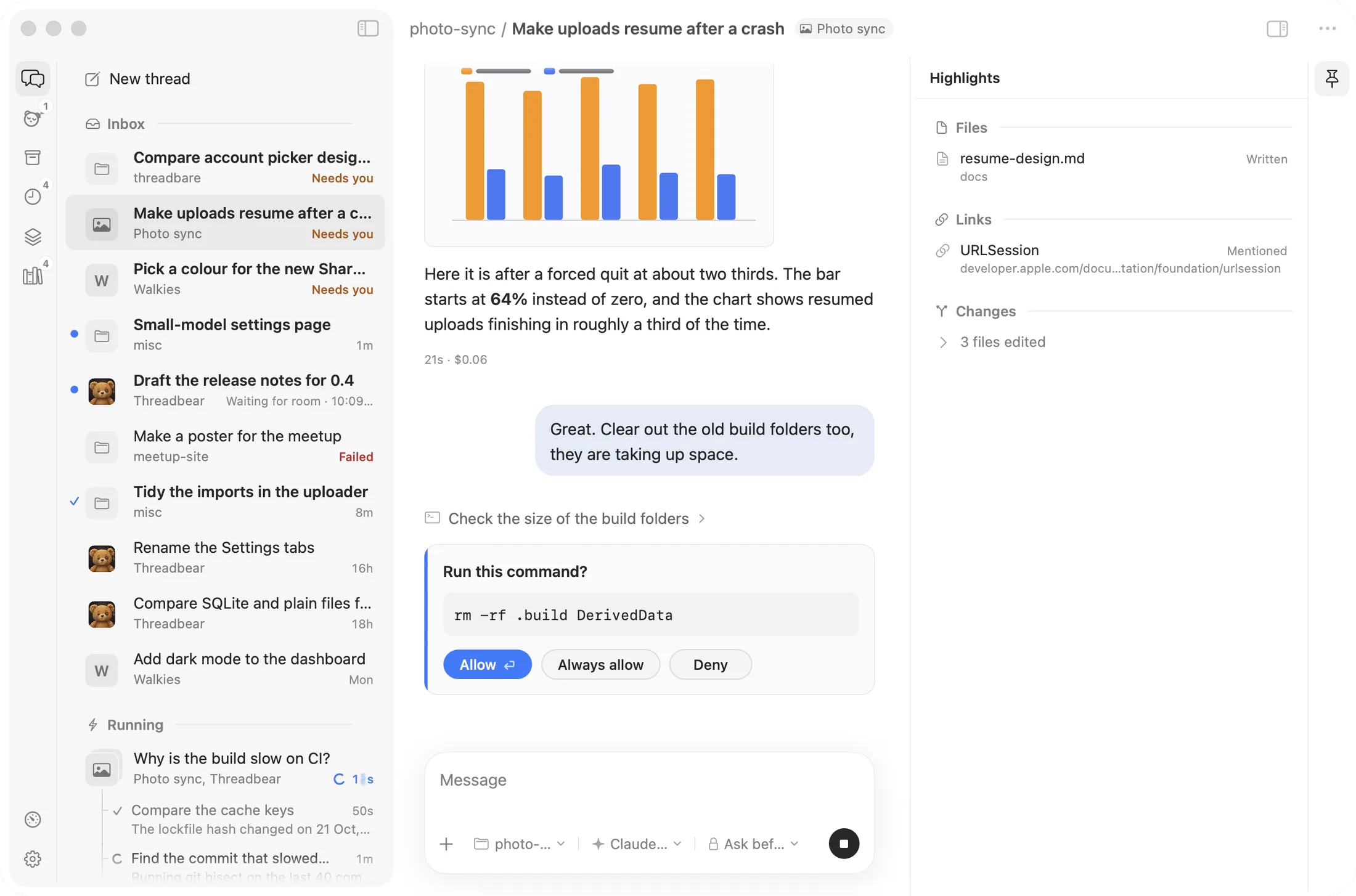
The Threadbear Mac app. On the left, the inbox: threads with a project tile each, some marked Needs you, and two running at the bottom. In the middle, a thread about making uploads resume after a crash, with a bar chart, the agent's reply and a card asking to run rm -rf .build DerivedData with Allow, Always allow and Deny. On the right, the thread's highlights: a file it wrote, a link and three files changed.
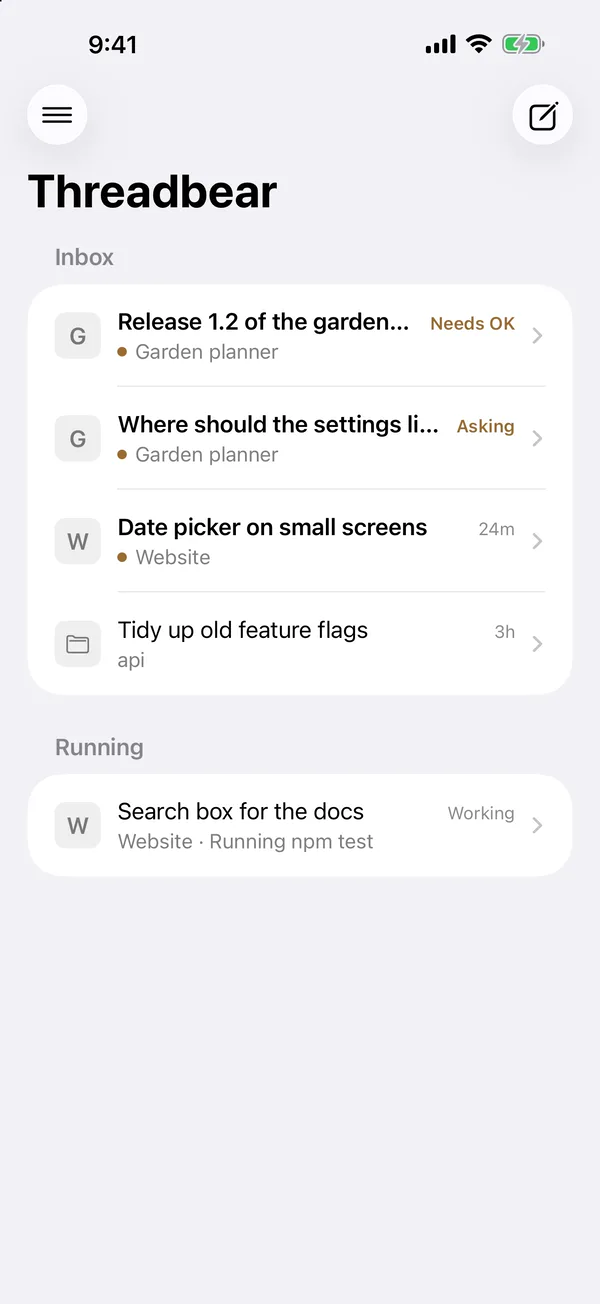
Threadbear on iPhone: the inbox, with Ship Poddle 1.0.1 marked Needs OK, a question about which database to use marked Asking, two finished threads and one running.

I kept wanting to change my agent app

Someone else's app

The agent apps I used were good, but each had a few things I couldn't change. Picking a project for every thread when it's nearly always misc, images that only half worked, and agents dying whenever the app quit or updated.

With Threadbear

New threads just start in your usual folder, and images show up right in the thread. A little runner in the background owns the agents, so quitting the app never stops a turn. And when I want something new, I ask a thread to add it.

What it does

Ask for a button and get one

Patches are small TypeScript files in your project's .threadbear/patches folder. They add buttons above the message box, panels beside the thread, and commands that run after each turn. Your agent can write one while you watch, and it shows up a few seconds later.

A few come built in, like the Convex dashboard for a folder with Convex in it, and a Simulator panel for an Xcode project.

.threadbear/patches/reseed.ts
export default {
  actions: [{
    title: "Reseed dev DB",
    run: "npx convex run seed:reset",
  }],
}
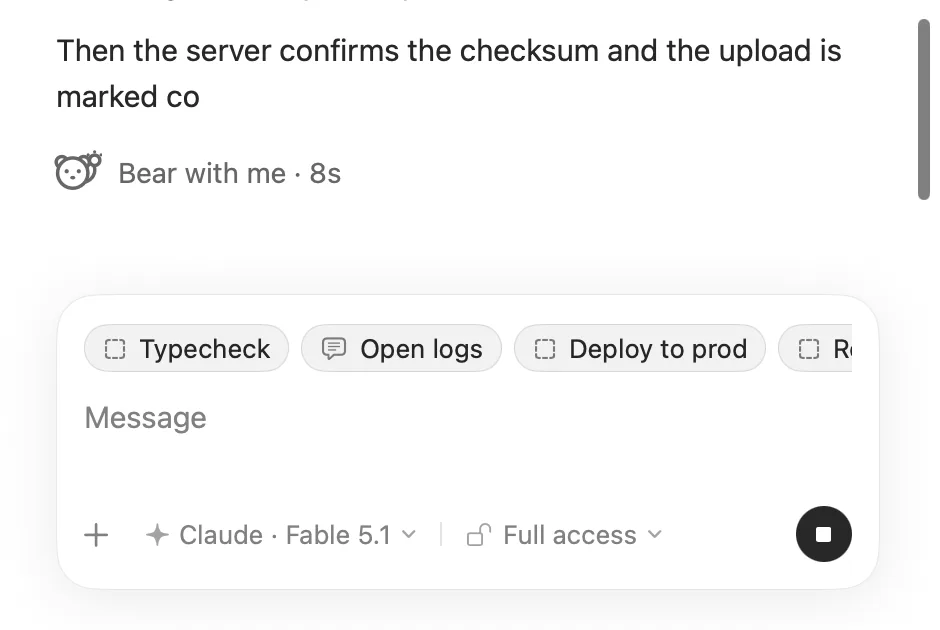
Part of a Threadbear thread while the agent is still writing, with Bear with me and 8 seconds so far under the reply, and a row of buttons from the project's patches above the message box: Typecheck, Open logs and Deploy to prod.

Your threads on your phone

The iPhone app has your inbox and the latest messages in each thread. You can reply, approve a command or answer a question from the couch, and it sends you a notification when a thread needs you.

Every thread has its own link too, so you can open it in a browser or paste it to yourself.

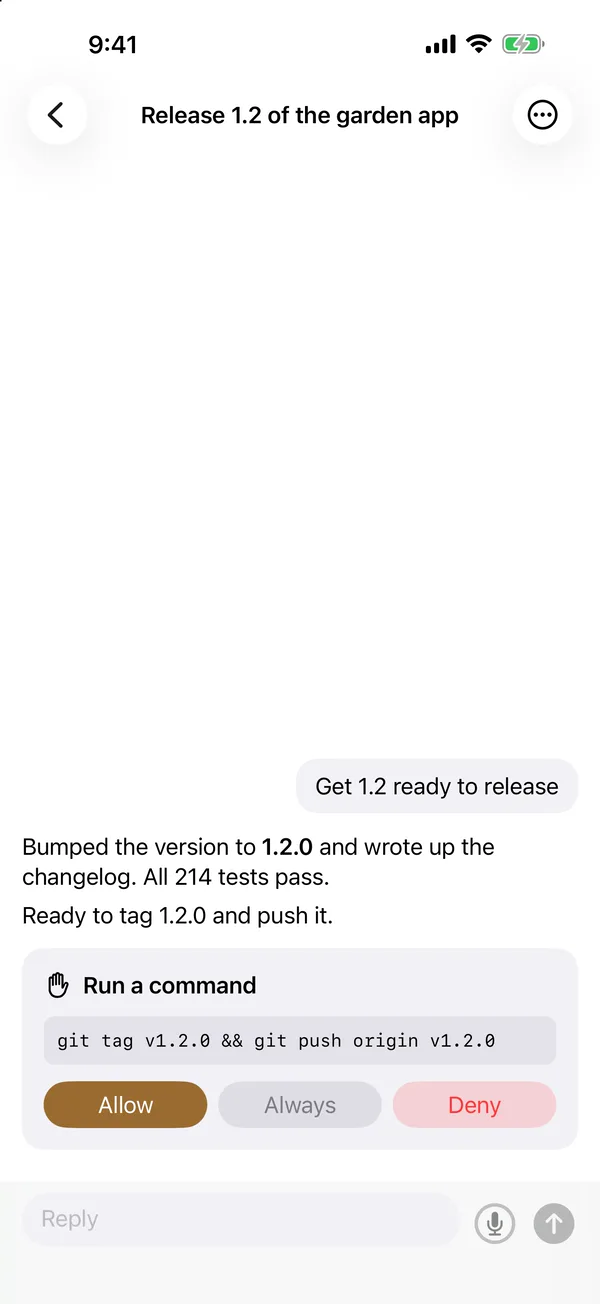
A thread on iPhone asking to run node scripts/appstore-submit.mjs, with Allow, Always and Deny buttons and a reply box at the bottom.
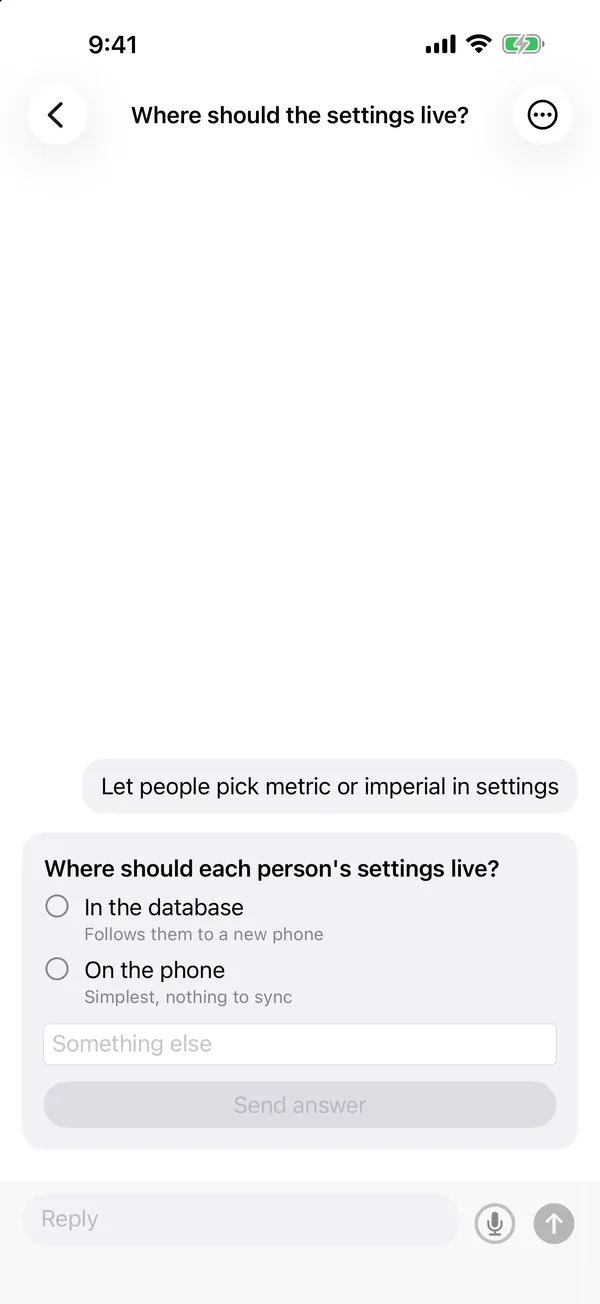
A thread on iPhone asking where the measurements should live, Convex or a JSON file, with a box for something else and a Send answer button.

Runs on the subscriptions you already pay for

Threadbear drives the official Claude Code and Codex command line tools, logged in as you, so it's your plan doing the work and nothing extra on top. Pick Claude or Codex, the model and how hard it thinks, per thread.

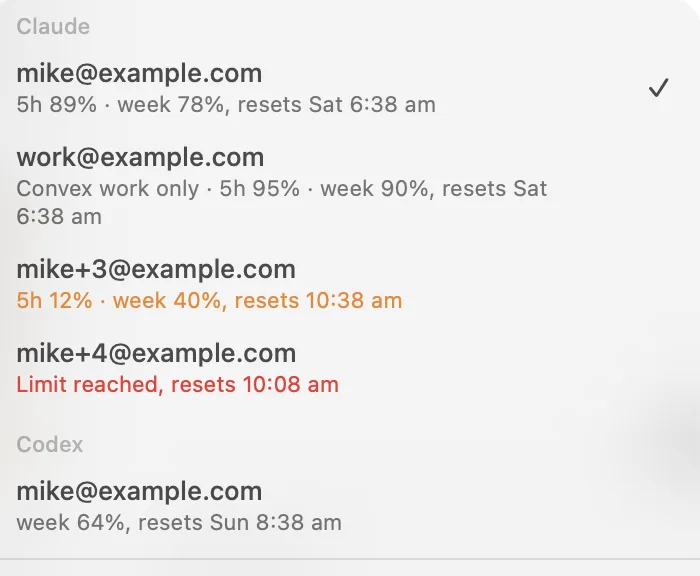
Got more than one account? The menu shows each login and how much it has left.

The account menu in Threadbear, listing four Claude logins and a Codex one, each with how much of its five hour and weekly limits is left.

Quick, even with lots of threads

It's a native Mac app written in SwiftUI and AppKit, so it opens fast and stays light. Threads that have gone quiet hibernate after half an hour, so their CLI isn't sitting there eating memory, and wake up right where they left off when you message them.

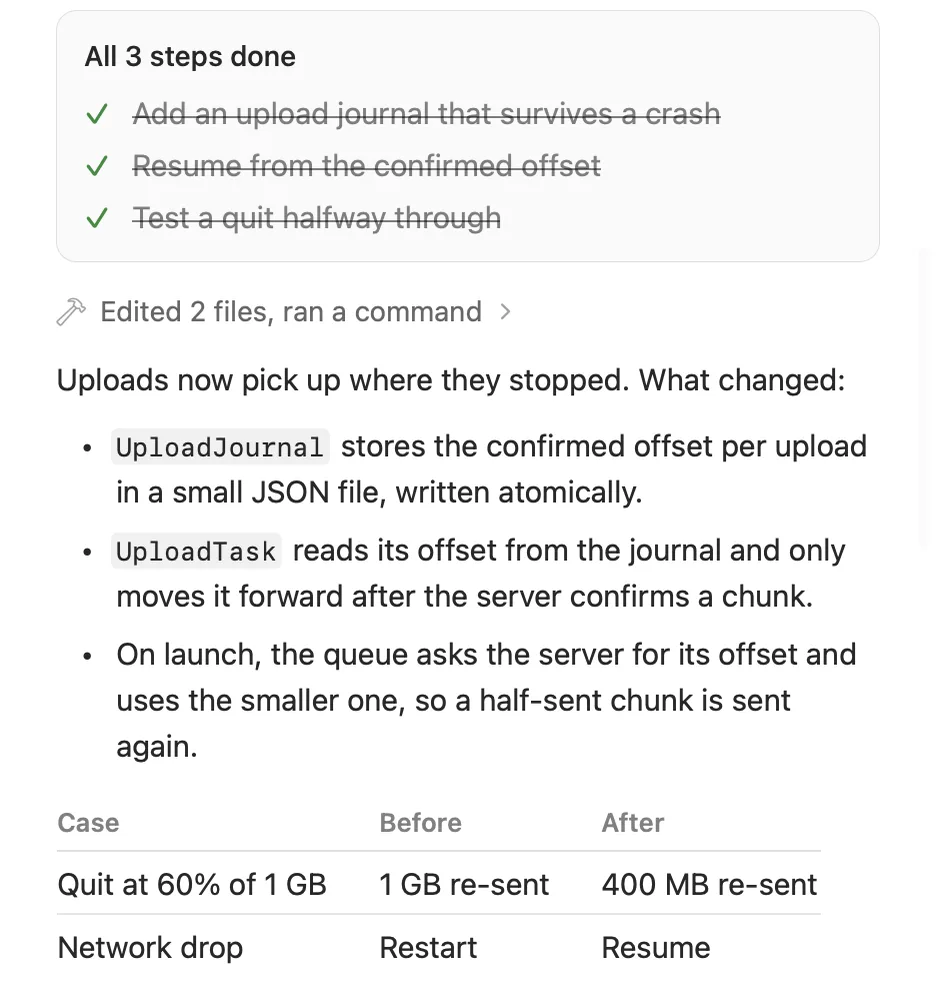
Part of a finished turn in Threadbear: a plan with all three steps ticked off, Edited 2 files, ran a command, a short list of what changed and a before and after table for an upload that gets cut off.

Your own backend, on Convex

When you install Threadbear it makes a Convex deployment in your own Convex account, and that's what your phone and browser talk to. Thread titles, the latest messages and anything waiting on you go up there. Full transcripts, tool output and images stay on your Mac.

None of it runs on a server of mine, so I never see any of it.

  1. Your Mac The app and the runner, with every full transcript
  2. Your Convex deployment Titles, the latest messages and what needs you
  3. Your iPhone and browser Read, reply and approve from anywhere

If something bugs you,
ask a thread to fix it.

How it works

  1. Fork it and install

    Fork the repo, clone it and run the installer. It builds the Mac app and the runner, and sets up a Convex deployment that's yours.

  2. Use your Claude Code or Codex login

    If you already use either one in a terminal, that's it. Threadbear starts threads with the logins already on your Mac.

  3. Pair your iPhone

    Scan the pairing code with the iPhone app and your threads show up on your phone.

Why I made it

I like some parts of [the app I was using]. I like the ability to snooze things... I don't like the way that it forces me into picking a project each time. I basically almost always pick misc so that seems redundant to me... I want it to be able to do all the things that I want to do and not more.

Mike Cann made Threadbear
A worn teddy bear covered in patches sits at a wooden workbench with a laptop open, sewing a new patch onto himself, with scissors, pins and scraps of fabric around him.

Questions people ask

What does it cost?

Threadbear is free. You need Claude Code or Codex, so a Claude or ChatGPT plan, which you're probably paying for already, and a Convex account for your deployment. Convex has a free plan and Threadbear only puts the small stuff up there, so I'd expect most people to fit in it.

Which Macs does it run on?

Macs with Apple silicon, on macOS 26 or later. There's no Windows or Linux version, but you'll have the source, so I don't think it would be that hard to get an agent to have a go.

Does it use my subscription or an API key?

Your subscription. Threadbear runs the official claude and codex command line tools, logged in as you, the same as running them in a terminal. It never reads or copies your login tokens.

What goes up to Convex?

Each thread's title and status, its newest 20 messages, anything waiting on you, and your projects and schedules. Full transcripts, tool output and images stay on your Mac. It's your deployment in your own Convex account, so none of it comes to me.

Do I need the iPhone app?

No, the Mac app does everything on its own. The iPhone app and the browser links are for when you're away from your desk.

What can a patch do?

Add buttons above the message box that run a command or send a prompt, add panels beside the thread (a web page, or a list Threadbear draws itself), and run a command after each turn, like a typecheck, telling the agent when it fails. A patch is a plain file in your repo, so it gets reviewed and committed like anything else.

Why would I want my own copy of the code?

So you can change anything you like. Threadbear is the app I wanted, and yours probably wants to be a bit different. Your agents can work on it like any other project, and you never have to wait for me to add something.

Will you add a feature for me?

Probably not, to be totally honest. It's my own tool and I mostly build what I use. But you'll have the source, and adding things is kind of the point.

Why is it called Threadbear?

A threadbare teddy is the one you've had for years, worn and patched and loved for it, and that's what I wanted this to be. There are a few bear words in the app too: snoozing a thread is Hibernate, the archive is the Den, and while an agent works it says Bear with me.

When can I get it?

Not quite yet. The code is private for now and goes public a bit later, and the iPhone app is on its way to the App Store. Once they're out, the buttons on this page turn into links.
The agent app
you can patch yourself

It's free and you get all of the source. The code goes up on GitHub for you to fork a bit later, and the iPhone app is on its way to the App Store.

Fork it on GitHubComing soon Coming soon to theApp Store